OneAccord translation pricing and alternatives for churches
Compare OneAccord translation (from $150/month for 5 hours, custom quotes above) with SermonLM ($99/month for 10 hours and included interpreter rooms).
SermonLM Team · · 9 min read
Try it on last week's sermon tonight. $10 free credit, no card required. Start with $10 credit
Last updated November 25, 2026. We build SermonLM, one of the options on this page. OneAccord details reflect oneaccord.com as of November 25, 2026.
SermonLM monthly plans let churches use their own human interpreters from anywhere at no extra charge, starting at $99/month for 10 service hours. OneAccord (oneaccord.com) is live AI sermon translation from $150/month for 5 hours, with custom quotes above. It offers 60+ languages, Moderation mode, and ProPresenter tools.
This page is for church administrators and pastors comparing plans before booking a sales call. SermonLM amounts are in USD. OneAccord lists $150/month on oneaccord.com (currency is shown as $ without specifying USD).
What is OneAccord translation?
OneAccord (oneaccord.com, formerly oneaccord.ai) is a live AI sermon translation service operated by In One Accord LTD in Southampton, UK. Churches connect a laptop to their sound desk with built-in audio quality monitoring, per OneAccord features. Guests scan a QR code in a phone browser to read text and listen to spoken audio, with no app download.
Per the OneAccord FAQ, OneAccord offers Broadcast mode for Sunday services and Conversation mode for two-way small groups. It also supports downloadable transcripts, post-session listener counts, custom logos, and branded listener links.
Note: this page covers oneaccord.com (live sermon translation), not the unrelated site oneaccord.cc or local congregations named One Accord Church.
How much does OneAccord cost in 2026?
OneAccord publishes one entry tier and quotes larger plans individually, based on OneAccord pricing and its terms.
- Starting plan: From $150 a month for 5 hours, described as typically enough for 1 service a week, with no setup fee.
- Higher plans: No fixed public rates above starter. Pricing depends on languages, hours, and users via a "Request a Quote" form.
- Free credits: Available after submitting a contact form to speak with a human representative. No self-serve sign-up is listed on the site.
- Included support: Optional onboarding call, weekly quality checks by its translation team, access to a staff audio technician, and Sunday support.
- Billing terms: Plans auto-renew and cancel any time in account settings. Payments are non-refundable, with no prorated refunds for unused periods, and 14 days' email notice on fee changes (terms updated October 27, 2026).
OneAccord does not publicly list an exact concurrent listener limit, language limit, max session length, overage rate, or yearly rate for its $150 starter plan. Ask for those numbers in writing before signing up.
OneAccord vs SermonLM side by side
This table compares published details from oneaccord.com and SermonLM pricing.
| Topic | OneAccord | SermonLM |
|---|---|---|
| Starting monthly plan | From $150/month for 5 hours | Standard $99/month for 10 service hours (3 AI languages at once) |
| Higher plans | Custom quote by languages, hours, and users | Premium $299/month (15 hours, 5 AI languages); Max $499/month (20 hours, 7 AI languages); Enterprise custom |
| Pay-as-you-go option | Not listed publicly | $10 per translation hour (1 hour in 1 language), billed by the minute, prepaid from $10, no monthly fee |
| How to start and test | Free credits after submitting a contact form | Self-serve sign-up with $10 starting credit once per email, no card needed |
| Published languages | 60+ languages (includes Cantonese) | 33 supported languages (Mandarin included; no Cantonese) |
| Human interpreter rooms | Not listed publicly (offers Moderation mode) | Included at no extra charge on every monthly plan, from anywhere |
| Listener and session limits | Not listed publicly | Up to 500 listeners and up to 6 hours per session on Standard, Premium, and Max (Enterprise custom) |
| Extra hours | Not listed publicly | Monthly plans: $8 per language hour, billed by the minute |
| Screen and livestream captions | ProPresenter, OBS, and Bitfocus Companion and Streamdeck API | Captions link for OBS, vMix, or ATEM; SRT file for YouTube |
| Bible version and church terms | Not listed publicly | Bible version reference per language; custom church Glossary with Translate To |
| Guest access | QR code in phone browser, text and audio | Permanent QR code or link in phone browser (text and audio), own earbuds |
| Setup and support model | Optional onboarding call, weekly QA, audio tech, Sunday support | Self-serve laptop setup with one audio cable from the mixer |
On a SermonLM monthly plan, 1 service hour counts once across all active AI languages. Paused time during worship music does not count. Monthly hours reset on the 1st (UTC) and do not roll over.
Where SermonLM fits better
SermonLM fits better when your church wants your own human interpreters included, clear self-serve plans, and sermon-specific scripture controls.
1. Your own human interpreters included on every monthly plan
Every SermonLM monthly plan includes live rooms for your church's own human interpreters at no extra charge. An interpreter signs in as a Translator on their own device from any location, in church or remotely. They hear the pastor, read the live text as an optional reference, and speak directly to listeners.
Interpreter rooms add no hours and do not count toward your AI language limit. You can pair human interpreters in one language with AI voice in other languages during the same service. Pay as you go and the starting credit do not include interpreter rooms.
2. Transparent self-serve pricing and 10 starting service hours
SermonLM Standard is $99/month for 10 service hours and 3 AI languages at once. OneAccord starts at $150/month for 5 hours on OneAccord pricing. For occasional bilingual events, SermonLM also offers Pay as you go at $10 per translation hour (1 hour in 1 language). It is billed by the minute, prepaid from $10, with no monthly fee.
You can sign up yourself with a $10 starting credit once per email address, with no card required. That gives about 60 minutes in 1 language, 30 minutes in 2 languages, or 20 minutes in 3 languages. See how live sermon translation works on Sunday for the full Sunday flow.
3. Bible version references and church glossary controls
When a quoted Bible verse is detected (in English, Spanish, Korean, and some other languages), SermonLM uses a real Bible text as reference. It still keeps the pastor's own words.
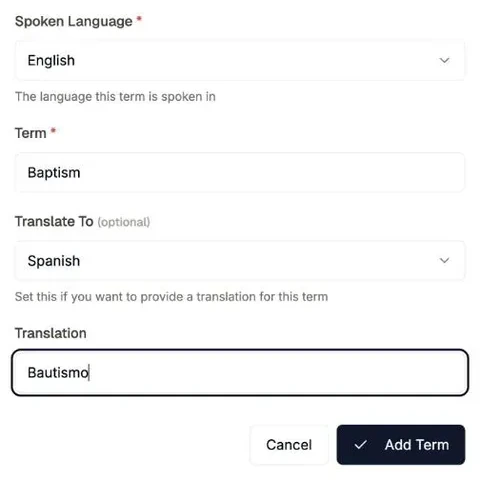
You can also add church terms, ministry names, and recurring names in Glossary using Translate To. The form below shows adding Baptism with the Spanish translation Bautismo.
4. Published listener capacity and simple one-cable setup
Standard, Premium, and Max support up to 500 listeners and up to 6 hours per session (Enterprise is custom). Guests use a permanent QR code or link in their phone browser on church Wi-Fi or phone data, with their own earbuds and no transmitters. One audio cable connects the sound mixer to a laptop running Chrome; see how SermonLM setup works.
Where OneAccord fits better
OneAccord is a stronger match for several specific church needs.
- Wider published language list (including Cantonese): OneAccord lists "60+ languages" on OneAccord languages. That includes Cantonese, Haitian Creole, Amharic, Hmong-Daw, Kinyarwanda, Nepali, Somali, European and Brazilian Portuguese, and Latin American Spanish. SermonLM supports 33 languages and does not support Cantonese.
- Pre-translation Moderation mode: A volunteer can review and edit the live transcript before AI translates it, per OneAccord Moderation features.
- Hands-on support and weekly quality checks: OneAccord includes an optional onboarding call, weekly checks by its translation team, staff audio technician access, and Sunday support, per OneAccord pricing and FAQ.
- AV, multi-campus, and small-group tools: OneAccord lists ProPresenter, OBS, and Bitfocus Companion and Streamdeck API integrations on OneAccord integrations FAQ. It also supports simultaneous multi-campus sessions, custom branded listener links, and two-way Conversation mode for small groups on oneaccord.com. SermonLM runs one live session per account at a time (multi-campus requires Enterprise).
How to test before Sunday and pick the right fit
Use your Sunday reality to narrow the choice quickly:
- Choose OneAccord if you need Cantonese or less common languages, ProPresenter or Streamdeck API control, two-way small-group Conversation mode, or hands-on weekly quality checks.
- Choose SermonLM for included human interpreter rooms and transparent self-serve pricing. Plans start at $99/month for 10 service hours, or $10 per translation hour Pay as you go. It also adds Bible version controls, a church glossary, and a published 500-listener ceiling.
For a broader look at hardware and software options, read our guide to choosing a church translation system.
Before inviting your congregation, test with a recorded sermon. Open Playback in SermonLM on a computer in Chrome or Edge. Play a past sermon video in another tab and check the live output with your pastor. Follow our guide to test sermon translation with a recorded sermon.
SermonLM needs internet and carries a short delay after the pastor speaks. Press Pause during hymns or worship music so paused time does not count.
Ready to weigh the numbers against your weekly schedule? Review current SermonLM plans.
Common questions about OneAccord translation
Is OneAccord translation the same as oneaccord.cc?
No. OneAccord (oneaccord.com, operated by In One Accord LTD) provides live AI sermon translation. oneaccord.cc is an unrelated website.
Does OneAccord include human interpreter rooms?
OneAccord does not list built-in live human interpreter audio rooms on oneaccord.com. It offers Moderation mode, where a volunteer can review and edit the live transcript before AI translates it.
Can you cancel OneAccord anytime?
Yes. According to the OneAccord terms, plans auto-renew and can be canceled anytime in account settings, with no prorated refunds for unused periods.