
Glossa Pricing and Alternatives for Churches
Compare Glossa pricing, per-language billing, and plans with SermonLM. See 3-language Sunday math, remote human interpreter rooms, and real limits.
SermonLM Team · · 8 min read
Try it on last week's sermon tonight. $10 free credit, no card required. Start with $10 credit
Last updated November 28, 2026. We make SermonLM, one of the options on this page. Glossa facts below come from glossa.live (verified November 27, 2026). All prices are in USD before tax.
Comparing Glossa against other church translation options comes down to billing units and whether you use human interpreters. Glossa charges $5 per hour per language on pay as you go, $99/month for 25 translation hours, and starts with 4 free translation hours. SermonLM charges $10 per translation hour, per language on pay as you go, $99/month Standard for 10 service hours across up to 3 AI languages, starts with $10 free credit with no card required, and includes remote human interpreter rooms on every monthly plan.
| Topic | Glossa | SermonLM |
|---|---|---|
| Starting price | $5/hour/language pay as you go or $99/month (25 translation hours) | $10 per translation hour, per language pay as you go or $99/month (10 service hours, up to 3 AI languages) |
| Free start | 4 free translation hours, no card required | $10 free credit, no card required (1 translation hour) |
| Your own human interpreters | Lists Transmit for local mic pass-through; no remote interpreter room listed | Included at no extra charge on every monthly plan (on-site or remote, any language, 0 service hours) |
| 3-language billing at $99/mo | 25 translation hours (about 8.3 one-hour services in 3 languages) | 10 service hours (10 one-hour services in up to 3 AI languages, or 30 language-hours) |
| Bible versions and guest access | QR browser (no app), custom dictionary, 100+ languages | QR browser (no app, up to 500 listeners), per-language Bible version reference and church glossary (no Cantonese) |
Try it on last week's sermon tonight. $10 free credit, no card required. Review full plan details on the SermonLM pricing page.
When SermonLM fits better
Your own human interpreters are the clearest reason churches choose SermonLM. On every SermonLM monthly plan (Standard, Premium, and Max), your church's own human interpreters can sign in as a Translator on their own device from the sanctuary or remotely, at no extra charge. They hear the pastor, read the live transcript as reference, and speak in any language. Interpreter rooms use zero service hours and do not count toward your AI language cap. Note that SermonLM's free credit and pay as you go do not include human interpreter rooms.
On the $99/month tier with 3 AI languages, SermonLM's service-hour billing also stretches further. One service hour counts once across all active AI languages on your plan, so 10 service hours cover 10 full one-hour services in 3 AI languages (30 language-hours total).
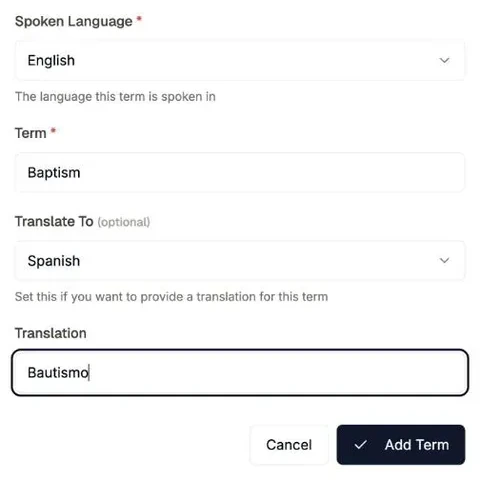
SermonLM is built specifically for live sermons, prayers, Bible readings, and announcements. You can select a Bible version per language so that when SermonLM detects a quoted verse in supported languages (including English, Spanish, and Korean), it uses a real Bible version as reference while keeping the pastor's own words. You can also add recurring staff names, ministries, and theological terms in Church Glossary per language. Families whose members speak different first languages can sit together in the same pew and follow on their own phones.
Hidden-cost and billing-unit check
Understanding the billing unit prevents surprises on Sunday. Glossa bills every tier in translation hours, meaning 1 hour of speaking across 3 languages uses 3 translation hours. SermonLM bills pay as you go in translation hours, while monthly plans bill in service hours (1 service hour covers all active AI languages up to your plan's language cap).
Also check how human interpreters are handled if your church uses volunteers. Glossa's Transmit feature sends a local microphone straight to phones without a remote interpreter workspace, whereas SermonLM includes remote Translator rooms on every monthly plan.
Glossa published plans
| Plan | Monthly price | Annual price | Included hours | Extra hours | Notable inclusions |
|---|---|---|---|---|---|
| Free Trial | $0 | Not applicable | 4 translation hours | Not applicable | No card required |
| Pay as you go | $0/month | Not applicable | 0 included | $5/hour/language | 24/7 email support; Voice Cloning for first 7 days |
| Standard | $99/month | $82.50/month ($990/year) | 25 translation hours/month | +$4 per extra hour | 24/7 email support; Voice Cloning for first 7 days |
| Advanced | $299/month | $249/month ($2,990/year) | 100 translation hours/month | +$3 per extra hour | 24/7 phone support; Voice Cloning included |
| Premium | $499/month | $416/month ($4,990/year) | 250 translation hours/month | +$2 per extra hour | 24/7 phone support; Voice Cloning included |
1-hour Sunday service in 3 languages (our math)
| Measure | Glossa | SermonLM |
|---|---|---|
| Pay as you go (1 service) | 3 translation hours = $15 | 3 translation hours = $30 |
| Services per month on $99/month | 25 translation hours / 3 = about 8.3 services | 10 service hours = 10 services |
| Extra hour beyond plan | +$4 per extra translation hour on Standard | $8 per language, billed by the minute |
Compare all monthly and pay-as-you-go tiers on the SermonLM pricing page.
Where Glossa costs less or does more
Glossa is a better match for several church setups, and it pays to weigh these trade-offs honestly:
- Larger free start: Glossa starts with 4 free translation hours compared to SermonLM's $10 free credit (1 translation hour).
- Half the pay-as-you-go rate: Glossa charges $5/hour/language versus SermonLM's $10 per translation hour, per language.
- More hours for 1 to 2 languages and higher tiers: At $99/month for 1 or 2 languages, Glossa's 25 translation hours cover 25 or 12.5 one-hour services compared to SermonLM Standard's 10 service hours. Glossa's $299 (100 translation hours) and $499 (250 translation hours) plans also include more total language-hours than SermonLM Premium (15 service hours, up to 5 AI languages) and Max (20 service hours, up to 7 AI languages).
- Lower overage rates: Extra hours on Glossa Standard, Advanced, and Premium are +$4, +$3, and +$2 per translation hour versus $8 per language on SermonLM.
- Wider language list and listener cap: Glossa lists 100+ languages (including Cantonese as listen-only) and unlimited listeners per session. SermonLM supports up to 500 listeners per session and does not support Cantonese.
- Automatic music exclusion: Glossa excludes silence and worship music automatically. On SermonLM, press Pause in the studio during hymns and worship singing so paused time does not count.
- Extra suite features: Glossa includes meeting bots (Zoom, Google Meet, Teams), Voice Cloning on higher tiers, weekly AI sermon recaps, RTMP ingest, and API/webhooks.
Quick FAQ
Does Glossa include remote human interpreter rooms?
No remote human interpreter room is listed publicly on Glossa's site. Glossa offers Transmit for sending a local microphone to phones. SermonLM includes remote and on-site human interpreter rooms at no extra charge on every monthly plan, using zero service hours.
Which costs less at $99/month for a 3-language church?
At $99/month for 3 AI languages, SermonLM Standard covers 10 one-hour services (30 language-hours) because 1 service hour covers all active AI languages. Glossa Standard's 25 translation hours cover about 8.3 one-hour services in 3 languages before +$4/hour overages apply. For 1 or 2 languages, Glossa's 25 translation hours cover more services.
How do Glossa and SermonLM handle worship music?
Glossa excludes silence and worship music automatically from billing. SermonLM is built for spoken words only, so your booth volunteer presses the microphone button and confirms Pause during hymns and worship singing; paused time does not count, and open human interpreter rooms stay active.
Can we test SermonLM on a past sermon before Sunday?
Yes. Open a past sermon video in Chrome or Edge on a computer, choose Playback beside the microphone control in SermonLM Studio, share that tab's audio, and listen on your own phone using your $10 free credit before Sunday.
How to try SermonLM
Route one audio cable from your sound mixer into a laptop running SermonLM in Chrome or Edge (the sound-desk cable is tested with a laptop only). Place your permanent lobby QR code at the entrance or on screen so guests scan and listen on their own phones with earbuds, with no app and no account.
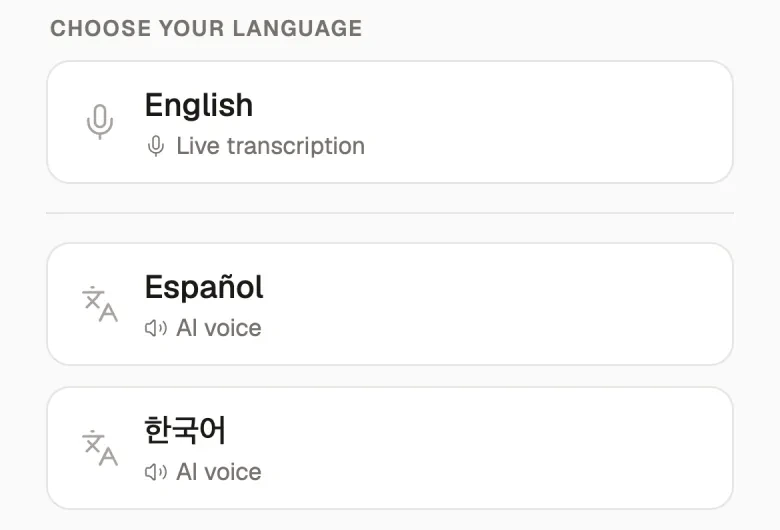
Walk through the weekday rehearsal steps in our guide to testing sermon translation with a recorded sermon, review the booth path on how SermonLM works, or check plans on the SermonLM pricing page.
Related Comparisons
- Wordly Alternatives for Churches
- OneAccord Pricing and Alternatives
- Hope Translator Pricing and Alternatives
- SermonLM vs FM Translation Headsets
Try it on last week's sermon tonight. $10 free credit, no card required.